Using AskBiz AI to Query Your POS Data
How to use AskBiz's AI chat to ask questions about your Point of Sale data — from daily sales summaries to product performance, staff analysis, and margin deep-dives.
Key Takeaways
- AskBiz AI can answer questions about your POS data in plain English — no SQL or spreadsheets needed.
- Start with specific questions like 'What were my top 5 selling products last week?' rather than vague ones.
- Combine POS questions with business-wide questions — for example asking how your POS margin compares to your eCommerce margin.
Connecting POS data to the AI
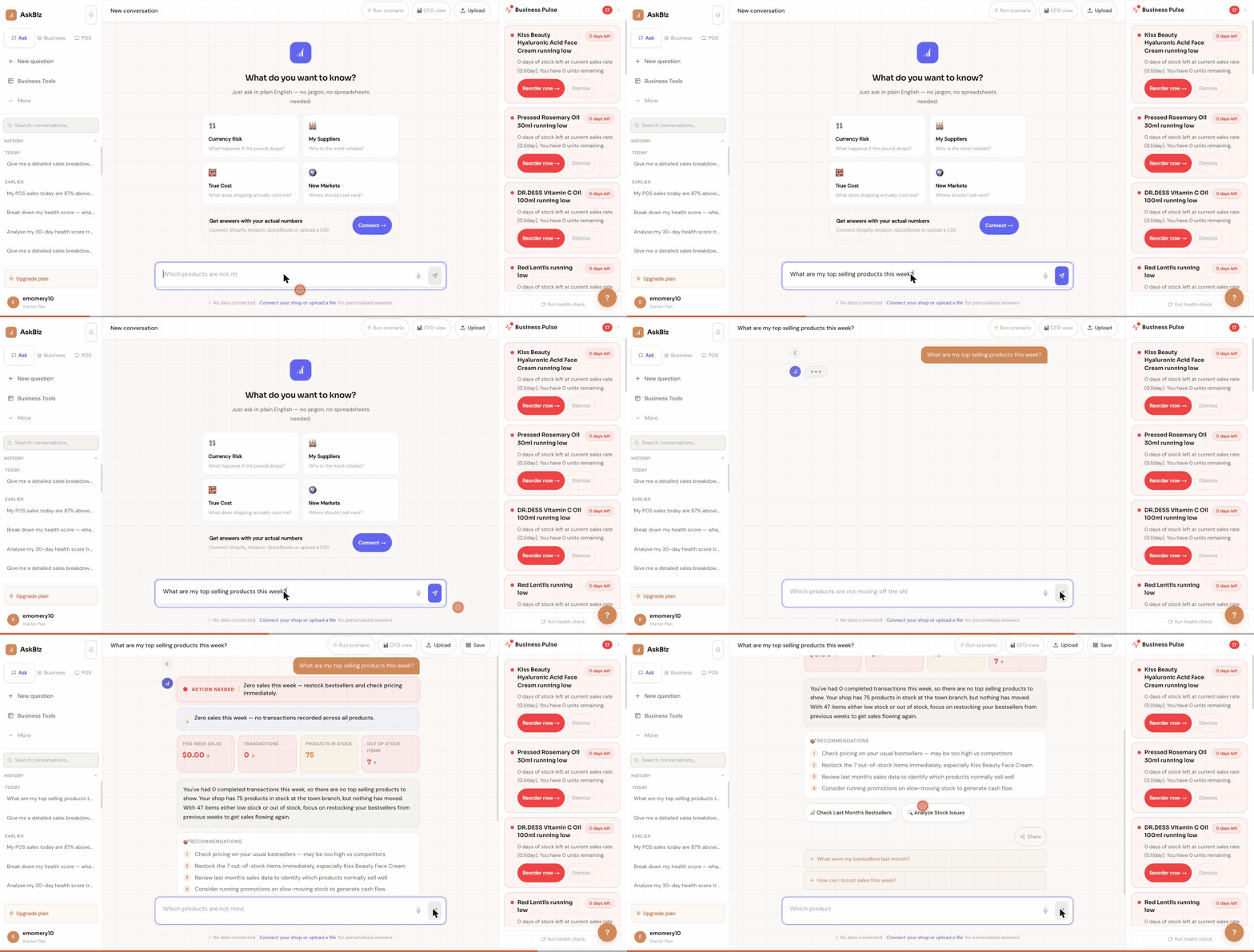
Your POS data is automatically available to AskBiz AI once you start processing sales through the till. Click the Ask tab in the top navigation. Type a question about your POS in the chat bar. AskBiz analyses your connected POS data and responds in plain English with the numbers, trends, or recommendations you asked for. The AI has access to transactions, inventory, staff performance, and all the data visible in your POS reports.
Good POS questions to start with
Here are example questions that work well: 'What were my top 10 best-selling products last month?' — returns a ranked list with units sold and revenue. 'Which cashier processed the most sales this week?' — compares staff performance. 'What is my average transaction value this month vs last month?' — shows the trend in basket size. 'Which products are below minimum stock right now?' — surfaces your current stock alert list. 'What was my gross margin last week?' — gives you the margin percentage for the period. Start specific — vague questions like 'how is my business doing?' get broad answers.
Asking about product and category performance
AskBiz AI can break down performance by category, individual product, or time period. Try: 'Show me margin by product category for last month.' — you'll see which categories are most profitable. 'Which products have I not sold any of in the past 30 days?' — surfaces dead stock that's tying up cash. 'What is my fastest-moving product this week?' — tells you what's flying off the shelves. 'What would happen to my revenue if I increased the price of [product] by 10%?' — uses the AI Sparring Partner for scenario analysis.
Combining POS with business intelligence
The real power of AskBiz AI is connecting your POS data with other sources. If you're also connected to Shopify or Amazon, you can ask: 'Is my online or in-store margin higher?' — AskBiz compares both channels. 'Which products sell better online vs in-store?' — helps you decide where to focus stock. 'What is my total revenue across all channels this month?' — consolidates POS and eCommerce into one figure. This cross-channel view is impossible to do manually across multiple dashboards — AskBiz does it in seconds.